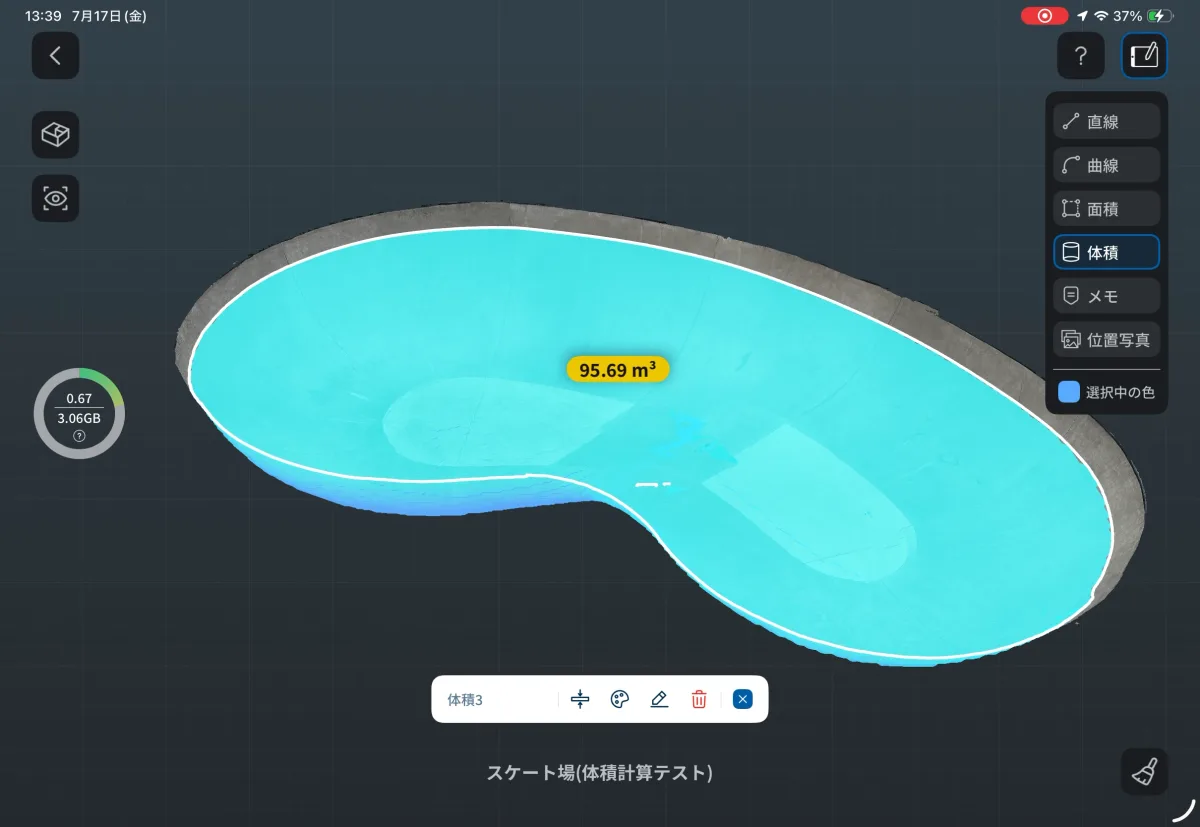
natThe company has released a new feature, “Volume Measurement,” for its 3D spatial scanning app “Scanat (Scannat), a 3D spatial scanning app.
With this update, you can now automatically calculate volumes from 3D-scanned models.
This feature is particularly useful at job sites where volume calculations are necessary, such as excavation, land development, and infrastructure maintenance.
*This feature is currently available as a beta version.
*An optional subscription is required to use this feature.
🔳Update Details
♦︎Added a volume measurement feature
Simply set a horizontal reference plane on the scanned 3D model to automatically calculate the volume of the object.
This enables a more detailed assessment of quantities based on 3D data captured on-site.
🔳You can use this in situations like these
♦︎Excavation Work
You can determine the volume of excavated holes, trenches, and other features, and use this information for earthwork volume management and as-built verification.
♦︎Land Development and Civil Engineering
By measuring the volume of fill, earthworks, sand piles, and other structures, you can streamline construction management and quantity verification.
♦︎Infrastructure Maintenance and Facility Management
You can also easily determine the volume of concave structures, such as pools and depressions, right on site.
🔳How to Measure Volume
① Add a horizontal reference plane
Start volume measurement using one of the following methods.
・Toolbar: “Volume” → “Add Horizontal Reference Plane” or
・Long-press the model screen: “Volume” → “Add Horizontal Reference Plane”


② Adjust the height
The height of the horizontal reference plane can be adjusted using any of the following methods:
, the slider
, or by entering a value.
After setting the height, press the check button to automatically measure the volume.

③ Easy to remeasure
You can remeasure as many times as you like by changing the height of the reference plane even after the measurement is complete.
It also supports volume measurements at multiple locations.

🔳Important Notes for Use
♦︎ Automatically detects concave and convex shapes
Whether the object is concave in shape, such as a
, a
, a
, or a
,
・Embankment
・Earthwork
・Sand pile
: The system automatically determines whether these are convex structures and calculates their volume.
♦︎Cases Where Measurement Is Not Possible
Volume measurement is not possible in the following cases.
・Shapes where it is impossible to distinguish between concave and convex areas
・Cases where concave and convex areas coexist within the same model
♦︎Please remove any obstructions in advance.
To obtain more accurate measurement results, we recommend removing any unwanted objects surrounding the target in Edit Mode beforehand.


▼Please update the app
To access the new features, please update to the latest version using the link below.
Please note that this feature is currently available as a beta version.
[> Update " Scanat" on the App Store]
*If you are a customer who has not yet implemented the system and would like to confirm whether it meets your company's business requirements, please [> contact us here].